Source Panel
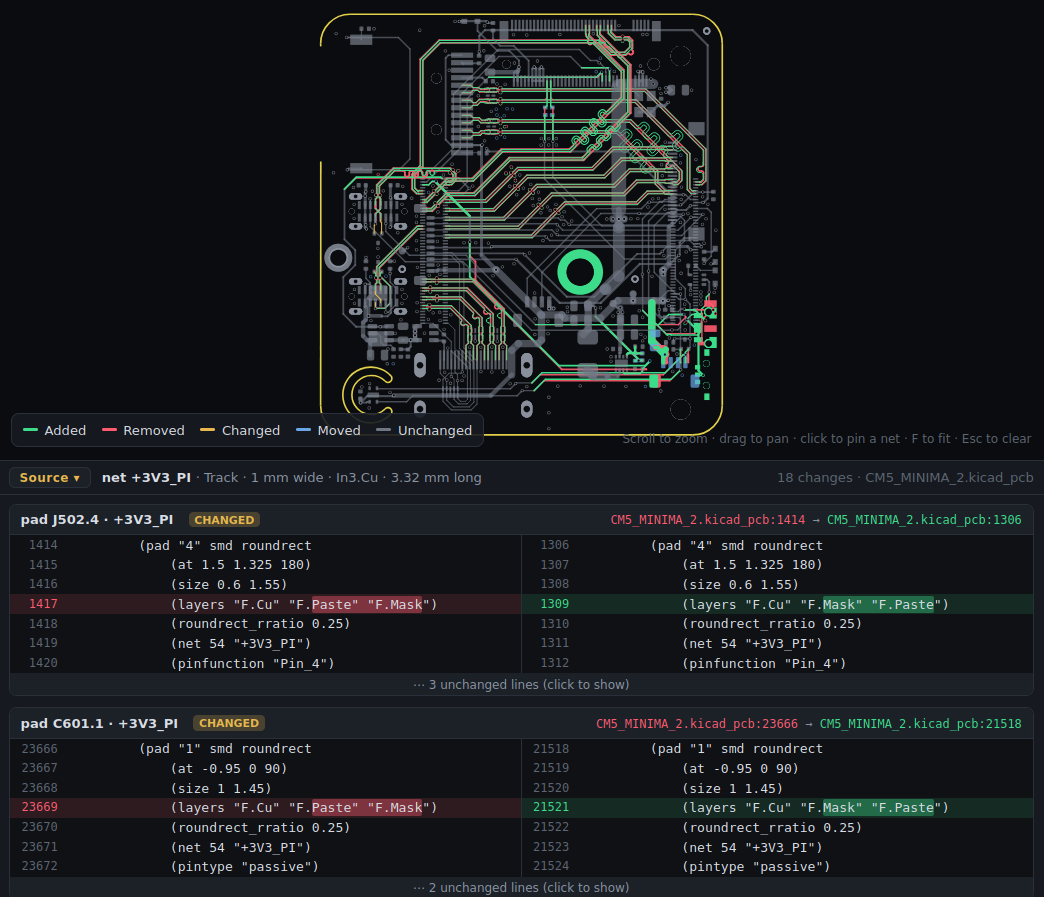
The source panel shows the text of what changed in the .kicad_pcb / .kicad_sch files, old on the left and new on the right, like a side-by-side code diff. It sits under the drawing on both tabs.
It's off by default because it makes pages bigger:
or tick Include source in the GUI.
What it shows
Removed lines are red, added lines green, and the changed part of a line is marked. Long unchanged stretches are folded (click to unfold).
| Hover | The panel shows |
|---|---|
| A trace, via or pad | Its own change first, then every other changed item on its net (and the net's pours) |
| A pad of a moved or edited footprint | The footprint's change first |
| A footprint in the sidebar list | That footprint |
| A wire, label or pin (schematic) | The net's changed wires and labels, on every sheet |
| A part | Its symbol's text |
| A bus | Its changed segments and bus labels |
Each change says where it is (owl_v1.kicad_pcb:722 → :722), so you can find it in an editor.
Using it
- Click pins the target, so you can move into the panel and scroll.
- Drag its top edge to resize it.
- The Source button collapses it.
Info
Only changed items' text goes into the page, not whole files. A pour's text stops before KiCad's computed fill polygons.